AI Employee for Small Business: What It Is and When It Pays Off
An AI employee is not science fiction. It is a defined role — inbox, CRM, chat — wired into your tools with clear rules and a human watching.
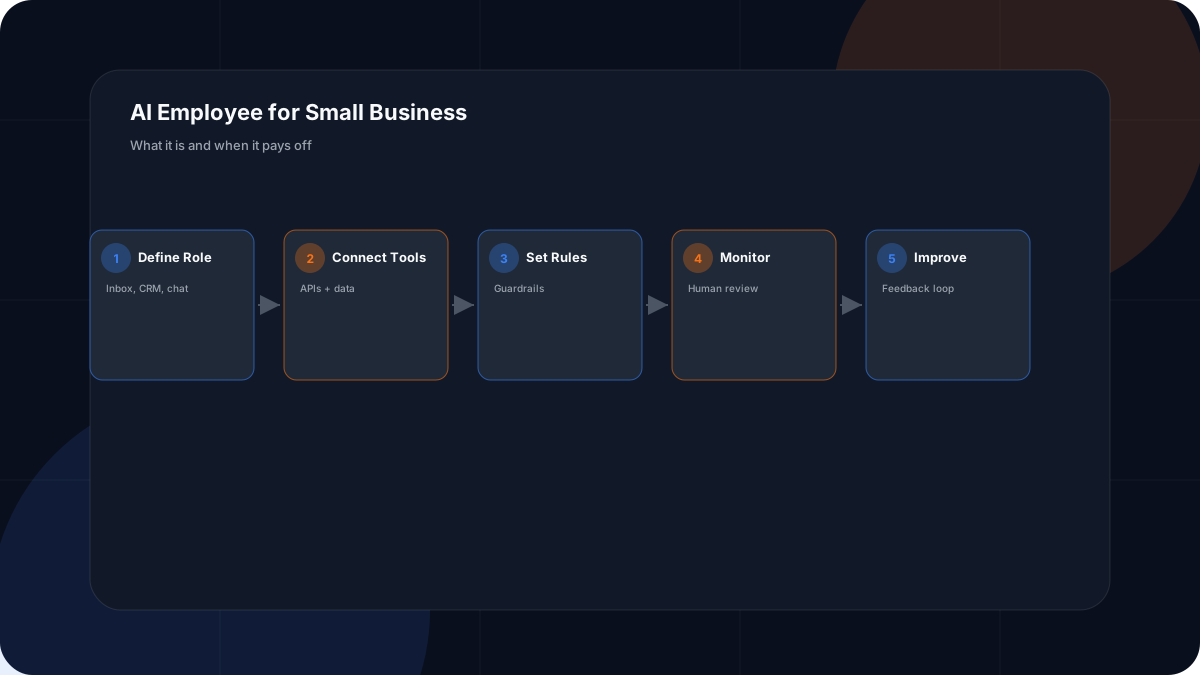
“AI employee” is a loaded term. Done responsibly, it means a configured assistant given one job — triaging messages, drafting replies, updating records — with access to your tools and a human supervising. This article explains what that looks like for real small businesses and where the line should stay.
Quick answer
An AI employee is a defined role wired into your business systems with clear rules and human oversight. It suits repetitive communication and admin work across email, CRM, and chat — not final decisions on legal, financial, or medical matters.
AI Employee vs Chatbot
A chatbot answers questions on a page. An AI employee is assigned responsibilities that span systems: read incoming messages, draft responses in your voice, log the interaction in your CRM, and trigger a follow-up. The difference is persistence and integration. Both should be honest about being automated when the customer is interacting with them.
Trade-Specific Examples
Contractors: acknowledge quote requests, collect job details, send reminders, log leads. Law firms: summarize intake calls, draft client follow-ups, organize notes (lawyer reviews). Accountants: triage client questions, draft routine replies, prepare meeting summaries. In each case the professional stays in control of the actual decision.
These map closely to the CRM and AI Automation Guide.
When It Pays Off
An AI employee pays off when one role repeats constantly and delays cost you leads or time. If you are a solo operator missing messages on job sites, the payback is fast. If your need is a single task, plain automation is simpler.
Guardrails You Must Set
- Define exactly what it can and cannot do.
- Keep a human in review for anything customer-facing.
- Limit data access to what the role needs.
- Never let it make final money, legal, or medical decisions.
- Monitor output closely at first, then sample ongoing.
Wade Digital can help set this up through AI automation services in Calgary.
AI Employee Readiness Checklist
Frequently Asked Questions
What is an AI employee?
An AI employee is a configured AI assistant given a defined role in your business — such as handling inbox triage, drafting client replies, or updating your CRM — with access to your tools and data under clear rules. It is more capable and persistent than a simple chatbot because it is wired into your workflows.
How is an AI employee different from a chatbot?
A chatbot answers questions on a page. An AI employee is assigned ongoing responsibilities across systems: it can read incoming messages, draft responses, log activities, and trigger follow-ups, then hand off to a human when judgment is needed.
Can an AI employee replace a virtual assistant?
It can take over repetitive parts of a virtual assistant's day — sorting email, drafting replies, scheduling — but it does not replace human relationships, decisions, or accountability. Most businesses use it to extend a small team, not replace one.
What can an AI employee do for a contractor?
It can acknowledge new quote requests, collect job details, send appointment reminders, and log leads in the CRM. That keeps a solo contractor from missing inquiries while on a job site.
How can an AI employee help a law firm?
It can summarize intake calls, draft client-friendly follow-ups, and organize case notes — always with a lawyer reviewing before anything goes to a client. It reduces admin time without touching legal judgment.
Can an AI employee help an accountant?
Yes. It can triage client questions, draft routine responses, and prepare meeting summaries. Sensitive filings still require a human, but the surrounding communication load drops.
Is an AI employee safe for client data?
It can be, if you use secure tools, limit access to what is needed, and keep humans in review. Never connect an AI employee to systems you would not trust a contractor with, and follow privacy law for client information.
How much does an AI employee cost?
Costs range from modest monthly tool fees to more for custom integrations. Calculate ROI from the hours and missed leads it recovers. Start with one role before expanding.
Do I need an AI employee or just automation?
If your need is a single repeating task, plain automation is simpler and cheaper. Choose an AI employee when you want one 'role' that handles language, drafts, and decisions across several connected systems.
What are the limitations of an AI employee?
It can be wrong, it lacks real-world judgment, and it should not make final decisions on money, legal, or medical matters. Treat it as a supervised assistant with clear guardrails and a human fallback.
How do I get started with an AI employee?
Pick one role, connect the tools it needs, write clear rules and boundaries, monitor its output closely at first, and improve from feedback. Wade Digital offers setup help via AI automation services.
Get the Free Master Lead Generator Website Blueprint
An AI employee needs a strong website and follow-up system to plug into. The free Blueprint PDF lays out that structure so your automation has a clear job: turn visitors into leads. Download it to design the system.
Related Resources
Conclusion
An AI employee is a supervised assistant with a defined role — not a replacement for judgment. It pays off when one repetitive role costs you time or leads. Set clear guardrails, keep a human in review, and connect it to a website and CRM that already convert. Download the free Blueprint PDF to see the full system.